
Refer and earn
ApparelAI referral program: share your link from Refer & Earn and get 10% of the credits your referrals buy, on every purchase, as credits that never expire.
With the ApparelAI referral program, you share your own referral link. When someone signs up through it, you earn 10% of the credits they buy, on every purchase, including subscription renewals and repeat credit-pack purchases. Your rewards are added to your balance as credits that never expire.
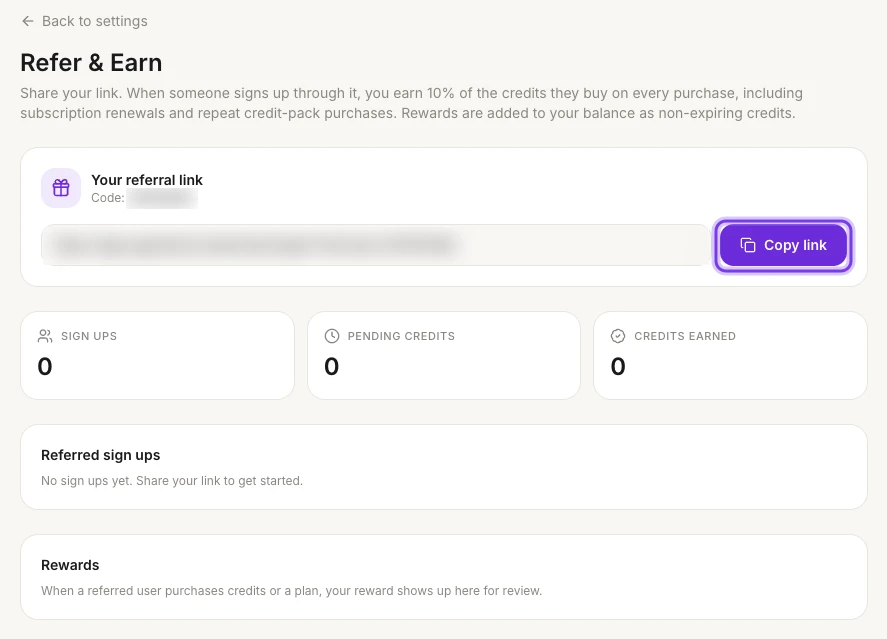
Open Refer & EarnShare your referral link
Open Refer & Earn
Click Settings in the sidebar, then Refer & Earn under it. You can also click the Refer & Earn card on the Settings page.
Copy your link
Under Your referral link, click Copy link. Your referral code is shown next to Code:, and it's already part of the link.
Share it
Paste the link into a message, an email or a post. The page has no share buttons, so you share the copied link yourself.
How referral rewards work
- Who counts: people who sign up through your link. They're listed under Referred sign ups.
- What you earn: 10% of the credits they buy, each time they buy credits or a plan.
- Every purchase counts: subscription renewals and repeat credit-pack purchases count too, not just the first purchase.
- Rewards are reviewed: a new reward shows up under Rewards for review, and counts as PENDING CREDITS until then. After the review, the credits are added to your balance.
- No expiry: reward credits never expire.
| When someone you referred buys | You earn |
|---|---|
| A Standard Pack (100 credits) | 10 credits |
| An Ultimate Pack (1,500 credits) | 150 credits |
| The Pro plan, monthly (50 credits a month) | 5 credits every month they pay |
Track your referrals
| On the page | What it shows |
|---|---|
| SIGN UPS | How many people signed up through your link |
| PENDING CREDITS | Reward credits waiting for review |
| CREDITS EARNED | Reward credits added to your balance |
| Referred sign ups | The people who signed up through your link |
| Rewards | A reward for each purchase your referrals make, shown here for review |
Reward credits go into the same balance as your other credits, so they show in the CREDITS widget in the sidebar. See How credits work.
Related
Notifications
Turn on browser and phone notifications to know the moment your AI photoshoot or bulk shoot is ready, and fix notifications that don't arrive.
Frequently asked questions
Answers to common ApparelAI questions about credits, plans, AI models, garment photos, sarees, videos, downloads and how to get the best results.