
Garment modes
Garment modes tune AI photoshoots for sarees, dupattas, salwar kameez and shirts, with the right upload slots, poses and styling options for each garment.
Use garment modes to tell ApparelAI what kind of garment you're shooting, so you get the right uploads and options for it. Three modes are made for AI photoshoots of ethnic wear: one each for sarees, dupattas and salwar kameez. In Saree Mode, for example, you upload the saree body, blouse and pallu as separate photos, so every part of the saree comes out like the real one.
Your mode applies when you start a New Photo Shoot and in Bulk Photoshoot. It changes three things:
- The upload slots on the Product step.
- The poses on the Pose step.
- Extra options on the Output step.
The modes
| Mode | Use it for | Product step | Poses and options |
|---|---|---|---|
| Standard | Garments that don't have their own mode, such as lehengas, kurtas, dresses and tops | Upload new product (front side) and Back side (optional), or a saved product | All preset poses |
| Saree Mode | Sarees | Saree Body (required), Blouse and Pallu | Five extra saree poses, Saree Styling (optional) and a choice of saree engine |
| Dupatta Mode | A dupatta sold on its own | The standard upload: a front photo and an optional back photo | Only the 7 dupatta poses. The model wears a plain kurti and pants in the dupatta's base color, so the dupatta stands out |
| Salwar Kameez Mode | Salwar suits and unstitched dress material | Top (Kameez) (required), Bottom, Dupatta and Sleeve | Outfit Styling (optional) |
| Shirt Mode | Shirts made from your fabric | Shirt Fabric (required), Logo, Collar and Cuff | An extra Three-Quarter Turn pose, Shirt Options and Logo Position (optional) |
Selling a suit set with a dupatta?
Use Salwar Kameez Mode and upload the dupatta in its Dupatta slot. Use Dupatta Mode only when the dupatta is sold on its own.
For quick answers about shooting sarees, suits and dupattas, see the sarees and ethnic wear FAQ.
Switch modes
You choose your mode under Photoshoot mode on the Settings page.
Open Settings
Click Settings in the sidebar.
Choose a photoshoot mode
Under Photoshoot mode, the modes are listed as cards, each with a short description: Standard, Saree Mode, Dupatta Mode, Salwar Kameez Mode and Shirt Mode. Pick the one for the garment you're about to shoot. Only one specialized mode can be on at a time.
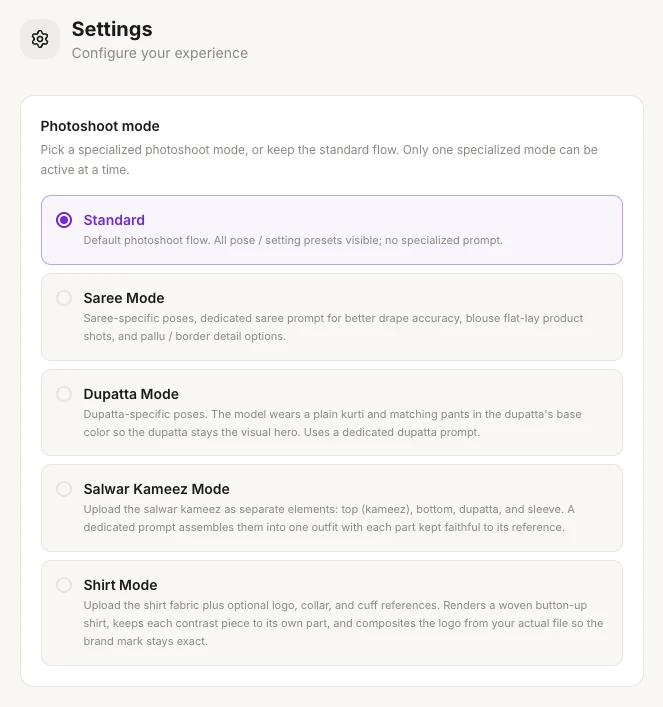
For sarees, choose the saree engine
When you pick Saree Mode, a Saree engine choice appears under it: Advanced (Beta) or Normal. You can switch any time, and the change applies to your next photoshoot. See Advanced Saree Engine.
For your other settings, see Account settings.
Presets for Indian ethnic wear photoshoots
Indian users see Indian presets first: the Ethnic poses on the Pose step, and the Ethnic Indoor and Heritage backgrounds on the Background step. See Choose poses and Backgrounds.
Related
Bulk photoshoot
Shoot your whole catalog with AI: add up to 50 products, apply one model, pose and background set to all, approve the first photo, then generate the rest.
Saree mode
Create an AI saree photoshoot: upload the saree body, pallu and blouse separately, use saree poses and Indian backgrounds, and add jewellery and a hairstyle.