
Buy credit packs
Buy credits in one-time packs of 50, 100, 500 or 1,500 from the Billing page. Pack credits never expire, and you don't need a subscription to buy one.
A credit pack is a one-time purchase that adds credits to your balance. You pay once, with no subscription, so it suits you when you'd rather buy credits as you go than subscribe.
Open BillingCredit packs
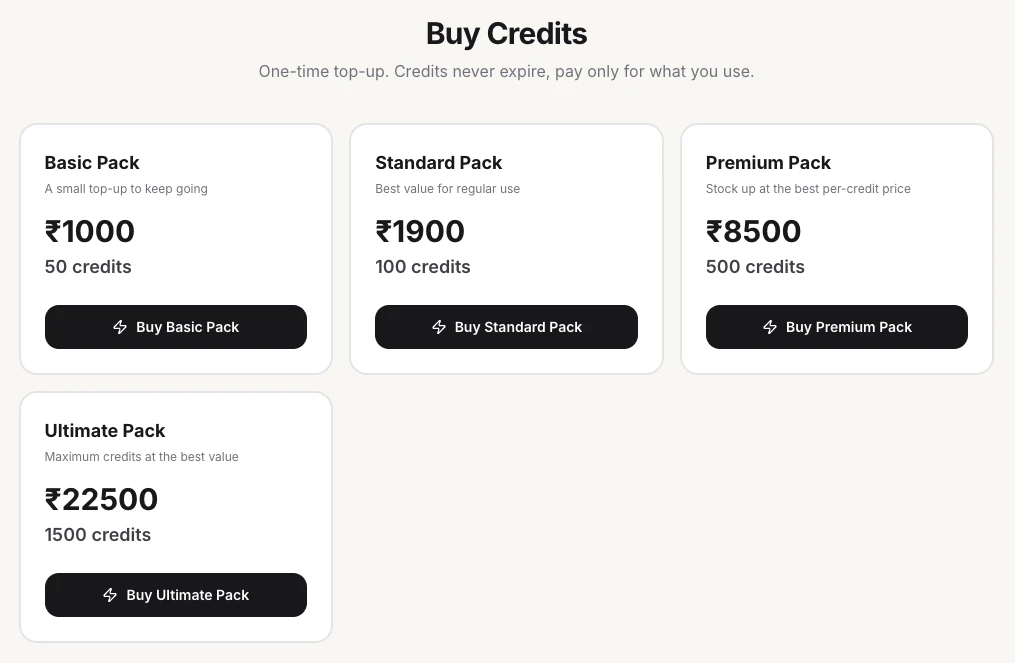
On the web, the packs are at the top of the Billing page, under Buy Credits:
| Pack | Credits | Photos at HD - 2K (2 credits each) | Button |
|---|---|---|---|
| Basic Pack | 50 | 25 | Buy Basic Pack |
| Standard Pack | 100 | 50 | Buy Standard Pack |
| Premium Pack | 500 | 250 | Buy Premium Pack |
| Ultimate Pack | 1,500 | 750 | Buy Ultimate Pack |
Each card shows the pack's price. The bigger the pack, the less you pay per credit.
Pack or plan?
- A credit pack suits you when you need extra credits now and then, not every month.
- A plan suits you when you generate about the same amount every month. Each plan includes a monthly allowance of credits. See Compare plans.
Buy a credit pack
Open Billing
On the web, click Billing in the sidebar. Buy Credits is at the top of the page.
Choose a pack
Click the button on the pack you want, such as Buy Standard Pack. The number of credits and the price are shown before you pay.
Pay
On the web, you pay by card. In the iOS app you pay through the App Store, and in the Android app through Google Play.
Check your balance
The new credits are added to your balance. In the web app, the CREDITS widget in the sidebar shows them: its second number is your plan's credits plus any one-time credits. See How credits work for what each photo, tool and video costs.
Good to know
- Credits from a pack never expire.
- Credit packs don't renew. Buy another pack whenever you need more.
- Purchases made in the iOS app are billed by Apple, and purchases in the Android app by Google Play. Refund requests for those purchases go to Apple or Google.
Related
Compare plans
Compare ApparelAI plans and pricing: Free, Pro, Growth, Business and Agency, with the monthly credits in each, monthly or annual billing, and how to upgrade.
Change or cancel your plan
Upgrade, downgrade or cancel your ApparelAI subscription on the web, iPhone or Android, wherever you bought it, and fix a failed payment that paused your plan.