
Compare plans
Compare ApparelAI plans and pricing: Free, Pro, Growth, Business and Agency, with the monthly credits in each, monthly or annual billing, and how to upgrade.
ApparelAI has a free plan and four paid plans: Pro, Growth, Business and Agency. Each plan gives you a different number of credits every month, and you spend credits when you generate. For current prices, see the ApparelAI pricing page.
In the web app, the plans are on the Billing page: click Billing in the sidebar. On the free plan, the Upgrade for more credits link in the sidebar's CREDITS widget opens it too. The page has two parts: Buy Credits at the top, for one-time credit packs, and Subscription Plans below it.
Plans at a glance
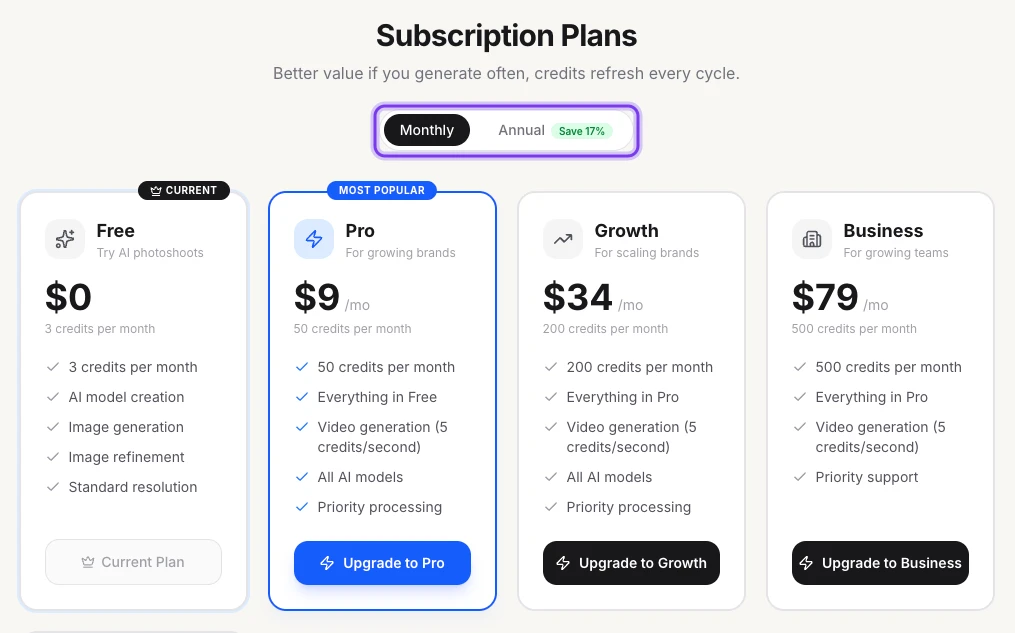
Each plan card on the Billing page shows the plan's monthly credits and what it includes:
| Plan | Credits per month | Made for | Listed on the plan card |
|---|---|---|---|
| Free | 3 | Trying AI photoshoots | AI model creation, image generation, image refinement, standard resolution |
| Pro | 50 | Growing brands | Everything in Free, video generation, all AI models, priority processing |
| Growth | 200 | Scaling brands | Everything in Pro, video generation, all AI models, priority processing |
| Business | 500 | Growing teams | Everything in Pro, video generation, priority support |
| Agency | 1,500 | Agencies and studios | Everything in Business, video generation, dedicated support |
Pro is marked MOST POPULAR. Your own plan is marked CURRENT and has a Current Plan button instead of an upgrade button.
The highlighted switch at the top shows Monthly or Annual prices.
To see what credits buy, such as 1 credit per photo at 1K, see How credits work.
The plan cards still list video generation at 5 credits per second. When you create a video, the app shows the current price before you generate: at the moment, most video templates cost 3 credits per second.
Choosing a plan for one feature
If you're choosing a plan for a specific feature, such as video, the AI tools or bulk photoshoot, check the plan cards on the Billing page before you subscribe, or ask support.
Upgrade on the web
Open Billing
Click Billing in the sidebar. On the free plan, you can also click Upgrade for more credits in the CREDITS widget.
Choose how often to pay
Under Subscription Plans, choose Monthly or Annual.
Pick a plan
Click the button on the plan you want, such as Upgrade to Pro, and pay by card.
To upgrade in the iOS or Android app, see Subscriptions in the app.
Billing period
On the Billing page, switch between Monthly and Annual to compare prices.
- Monthly: billed every month.
- Annual: billed once a year, at a lower price than paying monthly. The switch shows the saving, such as Save 17%.
- Weekly: available in the iOS and Android apps.
Prices in rupees or dollars
On the pricing page, select INR to see prices in Indian rupees, or USD to see them in US dollars.
If you subscribe in the iOS or Android app, the price can differ from the web because of local taxes, currency conversion and store pricing. The price shown in the app when you buy is the price you pay.
How you pay
- On the web: by card.
- In the iOS app: through the App Store, with your Apple ID.
- In the Android app: through Google Play, with your Google account.
You manage a subscription where you bought it. See Change or cancel your plan.
The free plan
The free plan gives you 3 credits a month, and you don't need a credit card to sign up. If you run out of credits on the free plan, you may be offered free credits for adding your mobile number. See Get free credits.
Need more credits?
If you'd rather top up than subscribe, buy a one-time credit pack. You can also switch to a plan with more monthly credits at any time.
Not sure which plan fits your catalog? Contact the team for help choosing.
Frequently asked questions
You can start free: the free plan gives you 3 credits a month, and you don't need a credit card. For the current prices of Pro, Growth, Business and Agency, in rupees or US dollars, see the pricing page.
Each month, Free gives you 3 credits, Pro 50, Growth 200, Business 500 and Agency 1,500. Plan credits refresh every billing cycle, and you can top up with a one-time credit pack.
Choose by how many credits you use in a month. A photo costs 1 credit at Standard - 1K and up to 3 at higher resolutions, so Pro's 50 credits cover up to 50 photos and Growth's 200 cover up to 200. If you need a specific feature, such as video or bulk photoshoot, check the plan cards on Billing before you subscribe, or contact the team.
Yes. Annual plans are billed once a year at a lower price than paying monthly, and the switch on Billing shows the saving, such as Save 17%. The iOS and Android apps also offer weekly billing.
Yes, at any time. Change or cancel it where you subscribed: on Billing in the web app, in your iPhone's Settings, or in the Google Play Store. See Change or cancel your plan.
Related
Download and export
Download AI photoshoot photos at original quality, one by one or all at once, and export marketplace-ready JPGs for Myntra (1080×1440), Amazon and more.
Buy credit packs
Buy credits in one-time packs of 50, 100, 500 or 1,500 from the Billing page. Pack credits never expire, and you don't need a subscription to buy one.