
Color variant
Show every colorway without a reshoot: recolor catalog photos with a new fabric photo, keeping the same model, pose and framing, for one or many photos.
Use Color Variant when you sell the same design in more than one color. Shoot one colorway, then recolor the finished catalog photos using photos of the fabric in another color. Each new photo keeps the same model, pose and framing, so the listings for every colorway match. You can recolor one photo or many at once.
Only have a hex code or a color name, not the fabric? Use AI Color Variation instead.
When to use it
- You have the same saree design in several colors. Shoot one, then recolor the photos for the rest.
- You sell a suit set, lehenga, kurta or kidswear design in more colorways and don't want to reshoot each one.
- You want a range to look consistent when buyers compare the colors side by side.
Recolor your catalog photos
Pick the photos to recolor
Choose one catalog photo, or several.
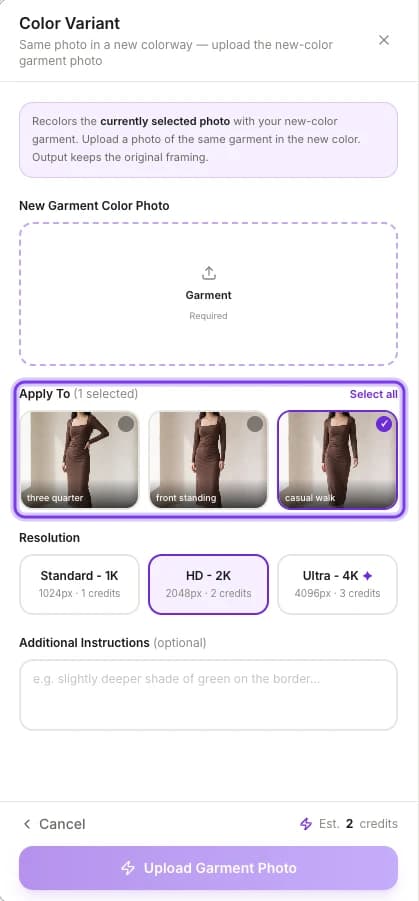
Add a photo of the new fabric
Upload a photo of the fabric in the new colorway.
Under the highlighted Apply To, pick the photos to recolor, or click Select all.
Generate
You get the same photos in the new colorway.
Photograph the new fabric
The new color comes from your fabric photo, so make the photo true to life:
- Lay the fabric flat and fill the frame with it.
- Use even light, so the color in the photo matches the real cloth.
For more photo tips, see Prepare garment photos.
Color Variant or AI Color Variation?
ApparelAI has a second recoloring tool, AI Color Variation, in AI Tools. The main difference is where the new color comes from.
| Color Variant | AI Color Variation | |
|---|---|---|
| Starts from | One or many catalog photos you already have | One source photo |
| The new color comes from | Photos of the fabric in the new colorway | Hex codes, color names or a swatch palette |
| Stays the same | Model, pose and framing | Model, pose, lighting and background, with prints and patterns kept |
| Use it when | You have the fabric in the other colorway | You have a target color as a code, a name or a swatch |
AI Color Variation renders up to 6 colors in one run. The app shows the cost before you run it: 2 cr for one color at the default 2K. See AI Color Variation.
In short: to recolor a whole shoot to match fabric you have in hand, use Color Variant. To try up to 6 colors on one photo from codes or names, use AI Color Variation.
Check before you publish
Compare each variant with the real fabric
Results can vary in color and small details. Check every recolored photo against the fabric you'll ship, especially the color and any print or border, before you list it.
For what each plan includes, see Plans.
Related
Shirt flat lay and folded shots
Create e-commerce shirt photos without a model: a flat lay or neatly folded shirt, front or back view, ready for marketplace listings next to your model shots.
Turn a photo into a video
Turn any fashion or product photo into a video for listings, Reels and ads: pick one of 20 motion templates or describe your own, then choose length and format.