
Create a lookbook
Turn one outfit photo into a four-look fashion lookbook styled in the mood you choose, ready for Instagram carousels, stories and collection pages.
The AI Lookbook Generator turns one photo of a garment or outfit into a lookbook image with four looks. The same model wears your outfit in four poses and settings, all in the mood you choose. Your garment's colors, prints, fabric and details stay true to the original.
Use it for Instagram posts, carousels and stories, lookbook sections on product and collection pages, launch teasers and email campaigns, and Pinterest pins.
Open AI LookbookWhat to upload
- Outfit photo (required): one clear, well-lit photo of one garment or a whole outfit, as a flat lay, on a mannequin, on a hanger or worn by a person. Make sure the whole piece is visible and in focus.
- Model photo (optional): a photo of the person you want to feature. Leave it empty, and an AI model wears your outfit.
It works for dresses, tops, shirts, jackets, trousers, skirts and co-ords, for women and men. If you upload a single top or bottom, it's styled with matching pieces and shoes into a complete outfit. To combine your own top and bottom in one photo, use AI Outfit Builder.
Only use photos with permission
Only add photos of people who have agreed to it. The terms of service require their explicit, written consent.
Moods
The mood sets the scene and the four poses of your lookbook.
| Mood | What it looks like |
|---|---|
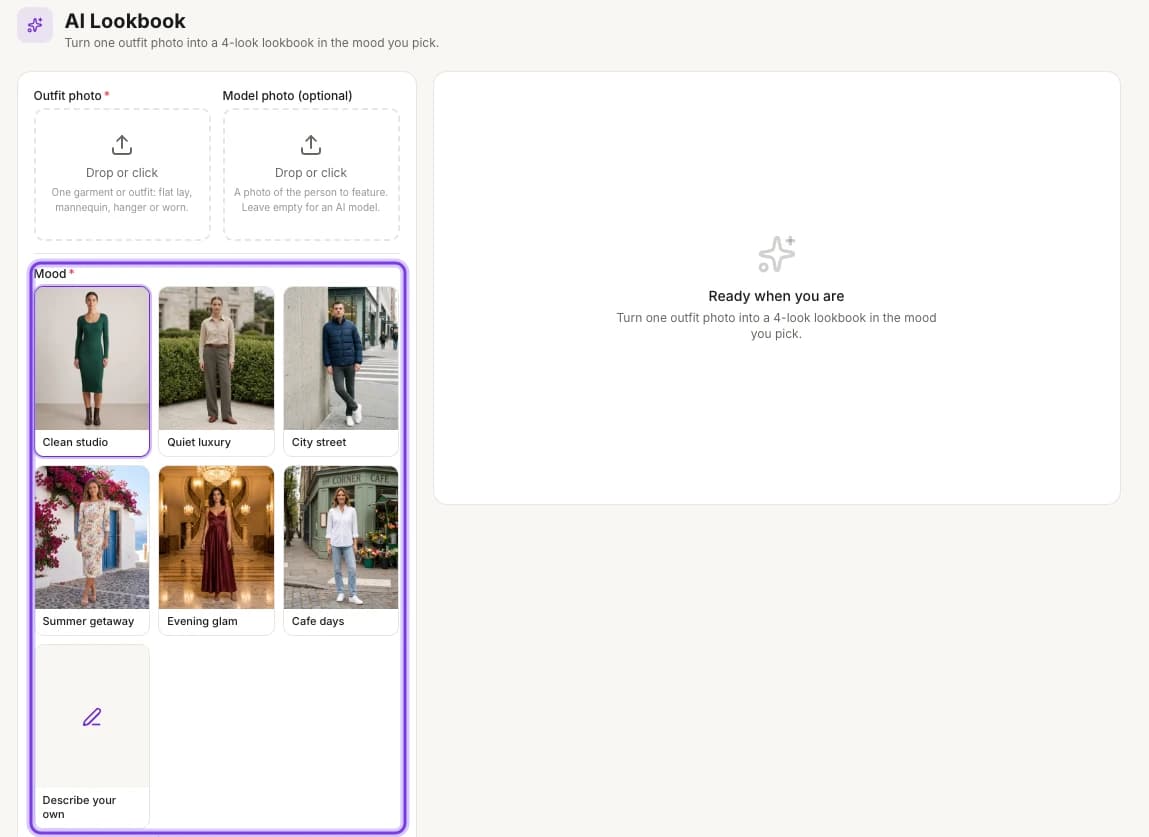
| Clean studio | A bright, plain studio, made for product pages |
| Quiet luxury | Stone terraces, clipped gardens and a wood-panelled library in soft daylight |
| City street | Concrete walls, crosswalks and storefronts with street-style energy |
| Summer getaway | Whitewashed walls, bougainvillea and the sea |
| Evening glam | A grand hotel with marble staircases and crystal chandeliers |
| Cafe days | A corner cafe, tree-lined sidewalks and a flower stall |
| Describe your own | Any setting, light and vibe you write, like "a rooftop bar at night with warm neon signs" |
Formats and sizes
Every aspect ratio comes in 1K, 2K or 4K. Pick the one that fits where the lookbook will be posted.
| Aspect ratio | Common size | Best for | Moods to try |
|---|---|---|---|
| Portrait (4:5) | 1080×1350 | Instagram feed posts and carousels, Pinterest pins | Quiet luxury, Clean studio |
| Vertical (9:16) | 1080×1920 | Instagram Stories, TikTok, mobile lookbooks | City street, Summer getaway |
| 3:4 | 1500×2000 | Product pages, wholesale PDF catalogs | Clean studio, Cafe days |
| Square (1:1) | 1080×1080 | Facebook ads, Shopify collection pages | Evening glam, Clean studio |
The common size is the usual upload size for each format on those platforms. Choose 2K or 4K for extra detail and room to crop.
How to make a fashion lookbook
Open the AI Lookbook Generator
On the web, select AI Tools in the sidebar, then AI Lookbook under CREATIVE.
The highlighted Mood options set the scene for your lookbook.
Upload your outfit photo
Upload one photo of the garment or outfit under Outfit photo.
Add a model photo (optional)
To feature a specific person, upload their photo under Model photo (optional). Leave it empty to use an AI model.
Pick a mood
Under Mood, choose one of the six moods, or choose Describe your own and write the setting, light and vibe you want.
Choose the aspect ratio
Under Aspect ratio, pick Square (1:1), Portrait (4:5), 3:4 or Vertical (9:16). Portrait (4:5) is selected at first.
Choose the resolution
Under Resolution, pick 1K (fastest), 2K (balanced) or 4K (premium). 2K (balanced) is selected at first.
Create the lookbook
Select Create lookbook. The button shows the cost, 2 cr at 2K, and becomes available once you've added your outfit photo. It's ready in about a minute.
Find your lookbook
Every run is saved in Tool history, so you can come back to it later. To open it, select History → at the top right of the page.
What you get
One lookbook image with four looks: the same model in your outfit, in four poses and settings, ready to post.
Credits
A lookbook costs 2 credits at 2K (balanced), the resolution that's selected at first. The Create lookbook button shows the cost before you start. You can try it on the free plan.
Related
AI tools
Every ApparelAI tool in one place: ghost mannequin, background remover and changer, lookbook generator, sketch to garment, color variation and outfit builder.
Make ghost mannequin shots
Create ghost mannequin product photos with AI: turn a hanger or on-model garment photo into clean invisible-mannequin front, back and side views for listings.