
Use marketplace presets
One-click image presets for Myntra, Amazon, Flipkart, Ajio, Meesho and Nykaa Fashion: the aspect ratio, white background, resolution and poses for each.
Marketplace presets set up a photoshoot for the marketplace you sell on. One click sets the pose, background, aspect ratio and resolution, and the poses and backgrounds that suit that marketplace are marked Recommended. The Myntra preset, for example, uses 3:4, the same shape as the 1080×1440 Myntra image size.
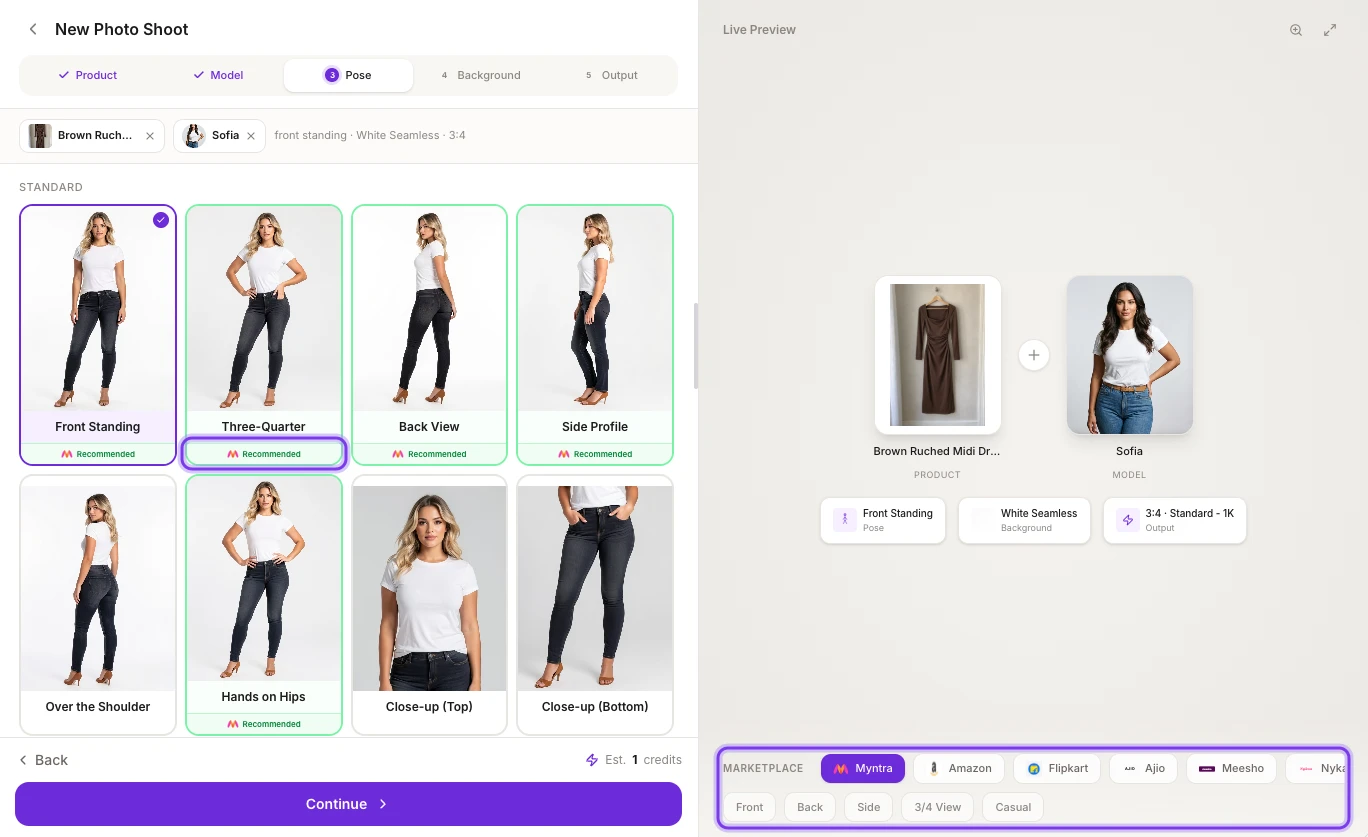
You'll find them in the MARKETPLACE bar under the Live Preview panel on the Create Photo Shoot page. There are presets for Myntra, Amazon, Flipkart, Ajio, Meesho and Nykaa Fashion.
Use a preset
Choose your product and model
Click New Photo Shoot in the sidebar, then choose your product and model as usual. See Create a photoshoot.
Pick your marketplace
In the MARKETPLACE bar, click the marketplace you're shooting for. Its preset chips appear, such as Front, Back and Side. To turn the marketplace off, click it again.
The highlighted Recommended label marks a pose that suits the marketplace.
Click a chip
Each chip is one listing photo. Clicking it sets the pose, background, aspect ratio and resolution, and takes you to the Pose step.
Check the pose and background
The poses and backgrounds that suit the marketplace have a green border, the marketplace's logo and a Recommended label. You can keep the preset's choices or pick another recommended option.
Generate
Go to the Output step, check the Shoot Summary and click Generate Photo Shoot.
Each photoshoot makes one photo. For a full set of listing photos, come back to the MARKETPLACE bar and run a shoot for each chip you need.
Image size, background and poses for each marketplace
| Marketplace | Aspect ratio | Resolution | Background | Chips |
|---|---|---|---|---|
| Myntra | 3:4 | HD - 2K | White Seamless | Front, Back, Side, 3/4 View, Casual (uses the Hands on Hips pose) |
| Amazon | 1:1 | HD - 2K | Pure white. The Lifestyle chip uses Minimalist Room | Front, Back, Side, 3/4 View, Lifestyle (uses Casual Walk) |
| Flipkart | 1:1 | Standard - 1K | White | Front, Back, Side, 3/4 View, Casual |
| Ajio | 1:1 | HD - 2K | White | Front, Back, Side, 3/4 View, Detail (uses Over the Shoulder) |
| Meesho | 1:1 | Standard - 1K | White | Front, Back, 3/4 View, Casual |
| Nykaa Fashion | 3:4 | HD - 2K | White. The Lifestyle chip uses Grey Backdrop | Front, Back, Side, Editorial (uses Power Pose), Lifestyle (uses Casual Walk) |
Each photo costs credits at the preset's resolution: 1 credit for Flipkart and Meesho (1K), and 2 credits for Myntra, Amazon, Ajio and Nykaa Fashion (2K). See How credits work.
Recommended poses and backgrounds
With a marketplace selected, the Recommended label shows which presets suit it. For Myntra, for example:
- Recommended poses: Saree Drape Front, Hands Clasped, Back Drape, Detail Close Up, Glam Touch, Front Standing, Three-Quarter, Back View, Side Profile and Hands on Hips.
- Recommended backgrounds: White Seamless, Sheer Curtain Studio and Grey Backdrop.
See Choose a pose and Choose a background for every option.
Before you list
- Marketplaces change their image rules from time to time. Check the current rules for your category before you upload.
- For Myntra listings, download your photos with the Myntra option under MARKETPLACE EXPORT, which sizes them to 1080×1440. See Download and export.
- Compare each photo with your product, especially logos, embroidery, borders and stitching.
Frequently asked questions
Myntra uses 1080×1440 pixel images, a 3:4 portrait. Shoot with the Myntra preset (3:4, HD - 2K and White Seamless), then choose Myntra under MARKETPLACE EXPORT to download 1080×1440 JPGs of up to 1 MB. See Export for Myntra.
For Amazon, MARKETPLACE EXPORT gives you 1600×2000 pixel JPGs, a 4:5 shape, of up to 8 MB. The Amazon preset shoots a 1:1 square at HD - 2K on pure white, so for the best fit with the export, generate in 4:5 Social instead. Check Amazon's current image rules for your category before you upload. See Export for marketplaces.
For Flipkart, MARKETPLACE EXPORT gives you 1500×2000 pixel JPGs, a 3:4 shape, of up to 8 MB. The Flipkart preset shoots a 1:1 square at Standard - 1K on white, for 1 credit a photo. For the best fit with the export, generate in 3:4 Portrait instead. See Export for marketplaces.
For Meesho, MARKETPLACE EXPORT gives you square 1500×1500 pixel JPGs of up to 5 MB. The Meesho preset already shoots 1:1 at Standard - 1K on white, so each photo costs 1 credit and has the same shape as the export. See Export for marketplaces.
For Ajio, MARKETPLACE EXPORT gives you 1800×2400 pixel JPGs, a 3:4 shape, of up to 10 MB. The Ajio preset shoots a 1:1 square at HD - 2K, so for the best fit with the export, generate in 3:4 Portrait instead. Nykaa Fashion isn't in the export menu: use the Nykaa Fashion preset (3:4, HD - 2K, white background) and download the original. See Download and export.
Related
Output settings
Choose the right aspect ratio (1:1, 3:4, 4:5, 9:16 and more) and resolution (1K, 2K or 4K) for listings, Instagram and ads, plus garment styling options.
Photoshoot templates
Browse 100+ ready-made fashion photoshoot templates, filter by clothing type, preview the lighting and composition, and recreate the look with your own product.